
Table of Contents
- Standing Desk Benefits for Office Workers: What You Need to Know
- Standing Desk Ergonomics: Setting Up Your Workspace Correctly
- How Long to Stand at a Desk: Finding Your Balance
- Standing Desk Height: Getting the Measurements Right
- Standing Desk Benefits and Disadvantages: The Full Picture
- Implementing a Sit-Stand Routine in Your Workday
- Common Mistakes to Avoid When Using a Standing Desk
- Frequently Asked Questions
Last Updated: October 7, 2026
Standing Desk Benefits for Office Workers: What You Need to Know
Sitting for eight hours straight isn't natural. Your body wasn't designed to stay still that long. Yet most office workers do exactly that every single day.
Standing desk benefits are real and measurable. When you switch between sitting and standing throughout your workday, you move more. You engage different muscle groups. Your circulation improves. Your energy stays steadier.
The shift from a static seated workstation to a dynamic sit-stand setup isn't complicated. But it does require the right approach. Many people buy a standing desk and use it incorrectly, which defeats the purpose entirely. This guide walks you through the actual benefits, how to set up your workspace properly, and how to build a routine that works.
Here's what we'll cover: the ergonomic foundations, the right balance between sitting and standing, correct desk height, the real trade-offs you should know about, and the specific mistakes most people make when they start.
Standing Desk Ergonomics: Setting Up Your Workspace Correctly
Proper setup is where everything starts. A standing desk only helps if you use it with correct posture and positioning.
Your monitor should sit at eye level when you stand. This means the top of the screen aligns roughly with your eyes. If you look down, your neck rounds forward. If you look up, your shoulders tense. Neither is sustainable for hours.
Your elbows should bend at roughly 90 degrees when your hands rest on the keyboard. This angle keeps your shoulders relaxed and your wrists neutral. Too high, and your shoulders hunch. Too low, and you strain your wrists and forearms.
Your feet should rest flat on the floor or on a footrest. Your knees should have a slight bend, not locked straight. This distributes your weight evenly and reduces strain on your lower back and legs.
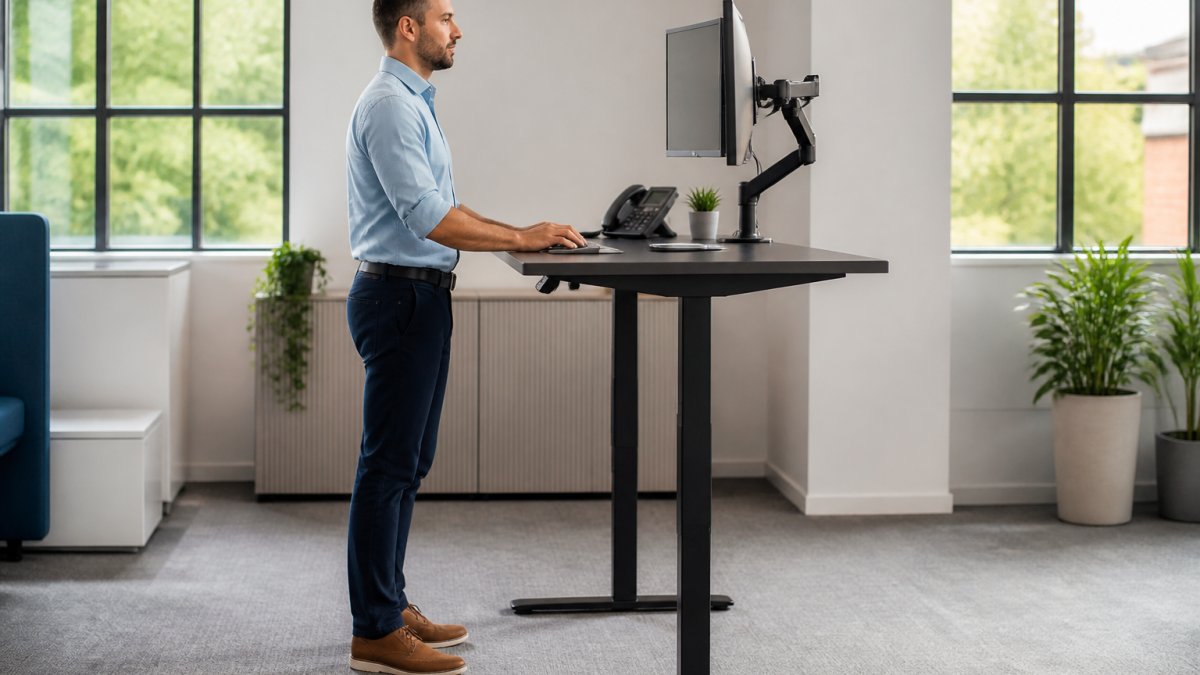
Many people underestimate how much desk height matters. Too high, and you reach upward to type, which exhausts your shoulders. Too low, and you hunch forward to see your screen. The Lavoro Advance Sit Stand Electric Desk range from THATSMYOFFICE offers dual motor height adjustment, so you can dial in the exact height that works for your body.

The desk surface itself should be large enough to hold your monitor, keyboard, and any materials you need without cramping. A cramped desk forces you into awkward positions. THATSMYOFFICE offers Lavoro desks in 120cm, 140cm, and 160cm widths, giving you genuine flexibility to match your actual workspace and needs.
How Long to Stand at a Desk: Finding Your Balance
There's no magic number. Your body is different from everyone else's, and your tolerance builds over time.
Most people starting with a standing desk should begin with 20 to 30 minutes of standing per session. Stand for that duration, then sit for a while. Repeat this cycle throughout your day. This approach lets your body adapt gradually without causing fatigue or discomfort.
After two to three weeks, many people can comfortably extend standing sessions to 45 to 60 minutes. Some reach 90 minutes or more. But the key word is "gradually." If you jump from zero standing time to standing for four hours straight, your feet, legs, and lower back will protest loudly.
Listen to your body. If your feet hurt after 20 minutes, sit down. There's no prize for pushing through pain. The goal is sustainable movement throughout your day, not endurance testing.
A common mistake is standing too long too soon, then giving up entirely because it felt uncomfortable. The discomfort wasn't from standing itself, it was from overdoing it. Start conservatively. Build from there.
Some people find that using a small footrest or balance board while standing keeps their muscles engaged and reduces fatigue. Others prefer a completely flat floor. Experiment and find what feels right for your body.
Standing Desk Height: Getting the Measurements Right
Correct height is the foundation of standing desk ergonomics. Get this wrong, and even the best desk won't help you.
When you stand at your desk with your arms relaxed at your sides, your elbows should bend at approximately 90 degrees when your hands rest on the keyboard (Working safely with display screen equipment). This is your working height. Measure from the floor to your elbow, then subtract about 2 to 3 centimetres. That's roughly where your desk surface should sit.
For most people, this lands somewhere between 70 and 110 centimetres. But "most people" is a wide range. Someone who is 5'2" will have a different optimal height than someone who is 6'2".
The Lavoro Advance desks offer height adjustment, which covers virtually every adult body size. The dual motor system means you can adjust smoothly and stop at exactly the right height for you. This flexibility matters enormously, especially if multiple people use the same desk or if you share a workspace with colleagues of different heights.

When you sit, the same principle applies. Your elbows should still bend at roughly 90 degrees. Your thighs should be parallel to the floor, or slightly angled downward. If your chair is too high, your feet dangle and your thighs compress. If your chair is too low, your knees rise too high and your lower back rounds.
Many people make the mistake of setting their standing desk height based on what "feels right" without checking the actual angles. Take five minutes to measure. Use your phone's camera to check your posture from the side. Small adjustments in height make enormous differences in comfort and fatigue.
Standing Desk Benefits and Disadvantages: The Full Picture
Standing desks offer genuine advantages when used properly. They also have real limitations. Understanding both helps you use one effectively.
The benefits:
Movement combats the effects of prolonged sitting. When you stand, you engage your core, your legs, and your back muscles. You shift your weight. Your circulation improves. Your metabolism stays slightly elevated compared to sitting.
Energy and focus often improve. Many people report that afternoon fatigue decreases when they incorporate standing into their routine. This isn't placebo. Movement stimulates blood flow to your brain. It keeps you more alert than remaining seated.
Lavoro Advance Sit Stand Electric Desk ADVS- 120cm →
Flexibility is another advantage. You can adjust your position instantly. If your back feels tight, you stand. If your feet feel tired, you sit.
The limitations:
Standing desks don't magically fix poor posture. If you stand with rounded shoulders, a forward head position, and your weight shifted onto one leg, you're still creating strain. You've just changed which structures bear that strain.
They require more attention to setup and adjustment than a standard seated desk. You need to get the height right, position your monitor correctly, and maintain good posture while standing. This takes more thought than simply sitting down.
Some people experience foot and leg fatigue, especially when starting. This usually improves with gradual adaptation, but it's worth acknowledging. If you have existing foot problems, plantar fasciitis, or knee issues, standing for extended periods may aggravate them.
Standing desks cost more upfront than fixed-height desks. A quality adjustable desk represents a genuine investment. The Lavoro Advance range at THATSMYOFFICE starts at £687, which is substantial but reflects the engineering required for smooth, reliable height adjustment.
Implementing a Sit-Stand Routine in Your Workday
The routine matters more than the desk. A great desk used poorly delivers minimal benefit. A modest desk used with a smart routine delivers real results.
Start with a simple pattern: stand for 20 to 30 minutes, sit for 20 to 30 minutes, repeat. Set a timer on your phone or computer if you need a reminder. After a week or two, this becomes automatic. You'll naturally feel when it's time to switch positions.
As your body adapts, you can adjust the ratio. Some people settle into 45 minutes standing, 15 minutes sitting. Others prefer 30-30. There's no universal best ratio. Find what feels sustainable for you.
Build your routine around your actual work patterns. If you have back-to-back video calls, you might stand for some and sit for others. If you do focused writing work, you might sit. If you're reviewing documents or collaborating with colleagues, you might stand. Match your position to the task.
Take advantage of natural transition points. When you finish one task and start another, switch positions. When you stand up to grab a coffee, adjust your desk to standing height. When you sit down for a phone call, lower it back to seated height.
Many teams find that shared standing desks work better when people establish a routine. If three people rotate through one desk, they can each have their preferred height saved if the desk has memory settings. The Lavoro Advance desks include memory functionality on some models, making this seamless.
Common Mistakes to Avoid When Using a Standing Desk
Most people make at least one of these mistakes when they start with a standing desk. Knowing about them in advance helps you skip the learning curve.
Mistake 1: Wrong height. This is the most common error. People set their desk too high or too low and wonder why their shoulders hurt or their wrists ache. Spend time getting the height right.
Mistake 2: Standing too long too soon. Jumping from zero standing time to standing for three or four hours creates fatigue and discomfort. Your body needs time to adapt.
Mistake 3: Poor posture while standing. Standing doesn't automatically fix posture. If you stand with rounded shoulders, a forward head, or your weight shifted to one side, you're creating strain in different places. Stand tall.
Mistake 4: Ignoring your feet. Your feet bear your entire body weight when you stand. If you're standing on hard flooring, your feet fatigue quickly. A standing mat or footrest makes an enormous difference.
Mistake 5: Never sitting. The goal is variation, not replacement. Some people buy a standing desk and feel like they should stand all day to justify the expense. This defeats the purpose.
Mistake 6: Forgetting about your monitor. People often adjust their desk height but leave their monitor in the same place. Now the monitor is at the wrong height relative to your eyes.
Mistake 7: Buying the wrong desk for your space. A standing desk that's too small cramps your work. One that's too large dominates your room.
Standing desks deliver real benefits when you use them correctly. The key is proper setup, gradual adaptation, and a balanced routine that includes both sitting and standing.
Frequently Asked Questions
What are the main standing desk benefits for office workers?
Standing desks improve circulation, reduce fatigue, and help maintain focus throughout the day. They encourage movement, which can boost metabolic rates and overall physical health. Many office workers report increased productivity and better posture when alternating between sitting and standing positions during their workday.
How long should you stand at a standing desk each day?
Most experts recommend alternating between sitting and standing every 30 minutes to an hour. Start with shorter standing intervals, such as 15-20 minutes, and gradually increase as your body adapts. The key is movement and variation rather than standing for extended periods without breaks.
Can standing desks help reduce back pain?
Standing desks can help reduce back pain by promoting better circulation and encouraging postural awareness. However, proper ergonomic setup is essential, your monitor should be at eye level, and your elbows should be at 90 degrees. Combining standing with regular movement and correct posture delivers the best results for managing discomfort.
Are there disadvantages to using a standing desk?
Standing for too long without breaks can cause leg fatigue and discomfort. Improper desk height or monitor placement may lead to neck and shoulder strain. The most effective approach is alternating between sitting and standing throughout the day, rather than standing continuously, to gain the benefits while minimising potential drawbacks.




0 comments